In an era where our lives are increasingly intertwined with technology, the dreaded low battery notification can send a shiver down anyone’s spine. From smartphones and tablets to laptops and smartwatches, keeping all your devices powered throughout the day is no longer a luxury but a necessity. A reliable power bank, or portable charger, transforms this constant anxiety into effortless convenience, ensuring you’re always connected, productive, and entertained, no matter where you are. This comprehensive guide will navigate the myriad of options available, helping you choose the best power bank to meet all your charging needs.
Power Bank – Your Perfect Portable Energy Solution
A power bank is essentially a portable battery designed to store electrical energy and supply it to charge other electronic devices. Initially, these devices were simple, low-capacity units meant for a quick phone top-up. However, driven by the rapid evolution of mobile technology and our increasing reliance on multiple gadgets, power banks have transformed into sophisticated portable powerhouses. Today’s power banks boast higher capacities, faster charging speeds, and a variety of ports and features, making them indispensable companions for daily commutes, extensive travels, outdoor adventures, and even during power outages. Their importance in modern life cannot be overstated, providing the freedom to use your devices without being tethered to a wall outlet, thus enhancing productivity, communication, and entertainment on the go.
Understanding Power Bank Types and Technologies
Navigating the world of power banks requires understanding the key characteristics that define their performance and suitability for different devices. These primarily include capacity, charging technology, and additional features.
Classification by Capacity (mAh)
The capacity of a power bank is measured in milliampere-hours (mAh), indicating the amount of charge it can hold. It’s crucial to distinguish between the advertised capacity and the rated (or usable) capacity. Due to energy conversion losses, the actual power delivered to your device is typically 60-90% of the labeled mAh.
- Compact & Everyday Use (5,000 mAh – 10,000 mAh): These are lightweight and pocket-friendly, ideal for a single smartphone charge or two, perfect for short outings or emergency backups. A 10,000 mAh power bank can usually fully charge a typical smartphone once or twice.
- Mid-Range & Versatile (10,000 mAh – 20,000 mAh): Offering a balance of portability and power, these can charge smartphones multiple times, power tablets, or keep smaller devices running for a couple of days. A 20,000 mAh unit is a sweet spot for most users, providing significant power without excessive bulk.
- High-Capacity & Multi-Device (20,000 mAh and above): Designed for power users, these are capable of charging laptops, multiple phones, tablets, and cameras over extended periods. Options like 25,000 mAh or 40,000 mAh are suitable for long trips, business travel, or situations where multiple devices need frequent recharges. It’s important to note that power banks exceeding 27,000 mAh (or 100 watt-hours) may face restrictions for carry-on luggage on flights, so always check airline regulations.
|
Our Picks for the Best Power bank in 2026
As an Amazon Associate I earn from qualifying purchases.
|
||
| Num | Product | Action |
|---|---|---|
| 1 | INIU Portable Charger, Ultra Slim 45W Fast Charging with Attached USB C Cable, Flight-Safe 10000mAh PD Power Bank Battery Pack, Travel Essential Phone Powerbank for iPhone 17 16 Samsung S25 Google etc |

|
| 2 | Anker MagGo Power Bank, Ultra-Slim 10,000mAh Magnetic Battery Pack, Qi2 Certified 15W Ultra-Fast MagSafe Compatible Portable Charger, Ergonomic Design, for iPhone17/16/15/14 Series Only(Not for Pixel) |
|
| 3 | Anker 737 Power Bank, 140W Max 3-Port Laptop Portable Charger, 24,000mAh, Smart Display, Compatible with iPhone 16 / 15 / 14 Series, Vision Pro, Samsung, MacBook, and More |
|
| 4 | Anker Zolo Power Bank (2025 Upgraded Version), 20,000mAh 30W High-Speed Portable Charger with Built-in USB-C Cable, Battery Pack for iPhone 17/16 / 15 Series, Galaxy, and More |
|
| 5 | charmast Portable Charger with Built in Cables, Power Bank with Cords Wires, Slim 10000mAh Travel Battery Pack 6 Outputs 3 Inputs 5A Fast Charging for Samsung Google Pixel LG Moto iPhone iPad |
|
| 6 | Portable Charger Power Bank, 60000mAh Battery Pack with 3 in 1 USB-C/iOS/Micro-USB Cable, 22.5W Fast Charging Portable Phone Charger, Travel Camping Essential Powerbank for iPhone 17/16 Samsung,Ebony |
|
| 7 | Anker Power Bank(PowerCore 10K), Compact Travel-Ready 10,000mAh Battery Pack with PowerIQ Charging Technology, 5V/3A High-Speed Charging for iPhone, iPad,and More (1, Black) |
|
| 8 | Anker Power Bank, 20,000mAh Travel Essential Portable Charger with Built-in USB-C Cable, 3-Port 87W Max Fast Charging Battery Pack, for MacBook, iPhone 16/15 Series, Samsung, Switch, and More |
|
| 9 | UGREEN QI2 Power Bank, 8.6mm Ultra-Slim 5000mAh Magnetic Battery, 20W PD Fast Charging Portable Charger, MagSafe-Compatible External Battery for iPhone 17/16/15/14 Series, Blue |
|
| 10 | Anker Prime Power Bank, 26,250mAh 3-Port Portable Charger with 300W Max Output, Two-Way Charging, TSA-Approved, App Control, for MacBook, iPhone 17/16 Series, and More (Base Not Included) |
|
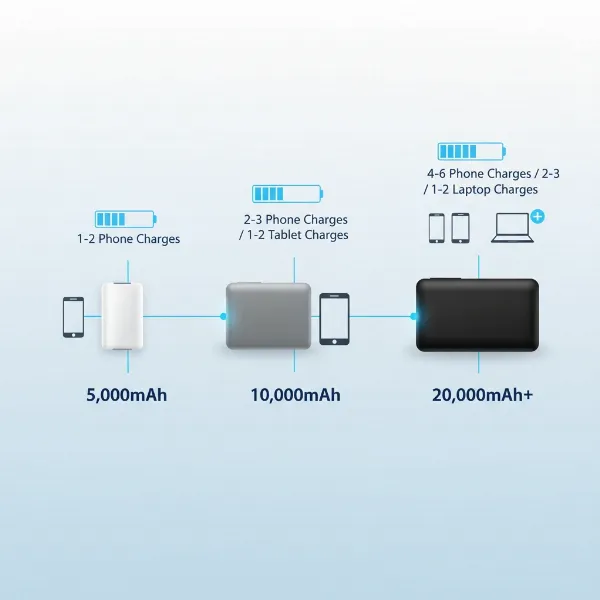 Illustration comparing different power bank capacities and their typical use cases
Classification by Charging Technology
Modern power banks integrate various charging technologies to deliver power efficiently and quickly.
- Quick Charge (QC): A technology primarily developed by Qualcomm, Quick Charge allows compatible devices (mostly Android phones) to charge significantly faster than standard USB charging.
- USB Power Delivery (PD): This is a universal fast-charging standard that can deliver much higher power levels (up to 100W or even 240W in newer specifications) over a USB-C connection. PD is essential for rapidly charging modern smartphones, tablets, and especially laptops, as it allows the power bank and the device to negotiate the optimal voltage and current for the fastest and safest charging speed.
- Wireless Charging (Qi/MagSafe): For ultimate convenience, many power banks now offer wireless charging capabilities based on the Qi standard. MagSafe-compatible power banks provide magnetic alignment for iPhones, ensuring efficient and stable wireless charging, often at speeds up to 15W.
Classification by Features
Beyond core charging capabilities, power banks come with a range of features that enhance user experience.
- Multiple Ports: Most power banks offer a combination of USB-A (for older devices) and USB-C ports (for newer devices and faster charging), allowing you to charge several devices simultaneously. High-end models may include multiple USB-C PD ports for fast-charging several power-hungry devices at once.
- Built-in Cables: Some designs integrate USB-C or Lightning cables directly into the power bank, eliminating the need to carry extra wires.
- Digital Displays: An LCD or LED screen can provide real-time information about the power bank’s remaining battery percentage, current charging speed (wattage), and input/output status, offering more precise monitoring than simple indicator lights.
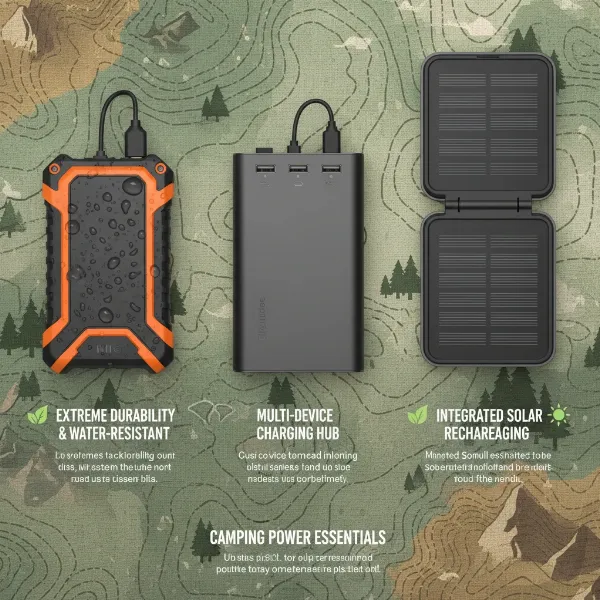
- Rugged Designs: For outdoor enthusiasts or those needing extra durability, rugged power banks are built to be shockproof, dustproof, and sometimes waterproof, offering enhanced protection against the elements.
How to Choose the Right Power Bank for Your Needs
Selecting the ideal power bank involves a thoughtful assessment of your personal usage patterns and device requirements. Making an informed decision ensures you get a portable charger that perfectly fits your lifestyle without overspending or underperforming.
Assess Your Device Ecosystem and Usage
The first step is to consider what you’ll be charging and how often.
- Smartphones Only: For occasional phone top-ups, a compact 5,000-10,000 mAh power bank with standard USB-A and perhaps one USB-C port might suffice.
- Multiple Phones & Tablets: If you need to keep several phones or a phone and a tablet charged throughout the day, a 15,000-20,000 mAh power bank with multiple ports (including at least one USB-C PD) is a better choice.
- Laptops & High-Power Devices: Charging laptops, portable gaming consoles (like Nintendo Switch), or high-end cameras demands a power bank with 25,000 mAh or more, featuring high-wattage USB-C PD ports (e.g., 45W, 65W, 100W). Ensure the power bank’s output wattage matches or exceeds your laptop’s charging requirements for efficient charging.
- Travel & Emergencies: For extended trips away from outlets, consider higher capacities (20,000 mAh+) and potentially rugged designs or those with built-in cables for convenience.
Prioritize Charging Speed and Compatibility
Charging speed is measured in watts (W) and directly impacts how quickly your devices regain power.
- Match Wattage: Check your devices’ charging brick output. If your phone supports 20W fast charging, a power bank with at least 20W USB-C PD output will charge it efficiently. For laptops, match the power bank’s output to your laptop charger’s wattage (e.g., a 65W laptop needs at least a 65W PD power bank).
- Fast Charging Protocols: Look for support for USB Power Delivery (PD) for iPhones, modern Android phones, tablets, and laptops. Qualcomm Quick Charge (QC) is important for many older Android devices.
- Input Speed: Also consider how fast the power bank itself recharges. Many modern power banks support high input rates via USB-C PD, allowing a 10,000 mAh unit to fully recharge in 2-3 hours with a suitable wall adapter.
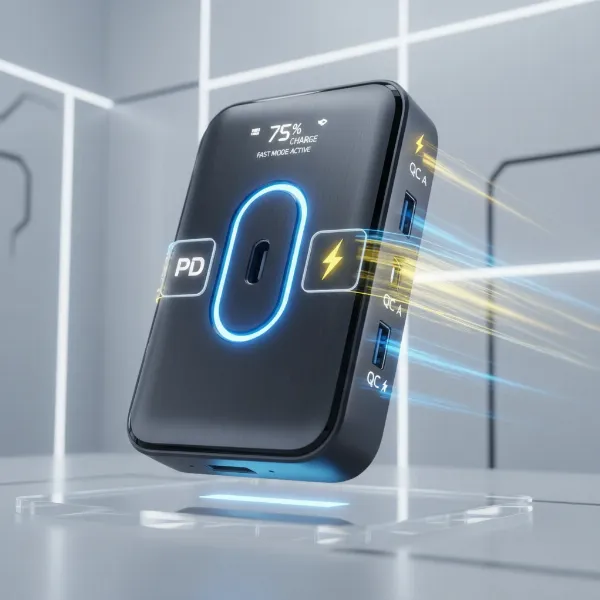 A power bank with multiple ports, highlighting USB-C PD and USB-A, and illustrative icons for fast charging technologies like Quick Charge and Power Delivery
Crucial Safety Features
Safety should be your top priority when choosing a power bank. High-quality power banks incorporate multiple layers of protection to prevent accidents and prolong the life of both the power bank and your devices.
- Battery Management System (BMS): A robust BMS is the brain of the power bank, actively monitoring and regulating charging. It prevents common issues like overcharging, over-discharging, over-current, short-circuits, over-temperature, and over-voltage.
- Official Safety Certifications: Look for recognized certifications such as UL (Underwriters Laboratories) or FCC (Federal Communications Commission) in the United States, CE in Europe, or RoHS. These marks indicate that the product has been independently tested for safety and compliance with relevant standards. Avoid generic, unbranded power banks, as they may lack these critical safety mechanisms.
Reputation and Warranty
Investing in a power bank from a reputable brand often means better build quality, more accurate advertised capacities, reliable safety features, and better customer support. Brands like Anker, Ugreen, Belkin, and Xiaomi consistently receive high ratings for their performance and durability. Always check the warranty offered, as a longer warranty period typically reflects the manufacturer’s confidence in their product.
Leading Power Bank Brands and Their Top Offerings
The power bank market is competitive, with several brands consistently delivering high-quality, innovative products. Here’s a look at some of the leaders:
- Anker: Widely regarded as a market leader, Anker is synonymous with reliability, advanced charging technology (like PowerIQ), and a broad product range. Their offerings span from compact Nano series for everyday carry to high-capacity Prime series for laptop charging, often featuring built-in cables and smart displays.
- Ugreen: Known for high-wattage outputs and robust designs, Ugreen power banks often cater to users with demanding charging needs, including powerful USB-C PD options for laptops and multiple devices.
- Baseus: This brand offers innovative features and stylish designs, often at competitive price points. Baseus products frequently include built-in cables, digital displays, and multi-functional designs, such as power banks that double as Wi-Fi hotspots.
- Belkin: Belkin focuses on solid performance and integration, particularly for Apple users with MagSafe and Qi2 compatible power banks. Their BoostCharge series prioritizes safety and reliable wireless charging.
- Xiaomi: A popular choice for value-conscious consumers, Xiaomi power banks combine sleek design with good capacity and features at an affordable price point, though sometimes with less cutting-edge technology compared to premium brands.
- RAVPower: While facing some past issues, RAVPower has historically offered reliable power banks with strong performance, often focusing on high-capacity options.
- Nestout: Emerges as a strong contender for rugged outdoor use, offering durable, versatile, and weather-resistant power banks with good capacity and multi-device charging capabilities.
Detailed Brand Comparison
| Brand | Key Advantages | Typical Disadvantages | Price Range |
|---|---|---|---|
| Anker | High reliability, advanced tech (PowerIQ, PD), wide range, excellent customer support | Often higher priced | Mid-High |
| Ugreen | High wattage output, robust build, multiple ports | Can be bulkier for high capacity models | Mid-High |
| Baseus | Innovative features (built-in cables, displays), competitive pricing, stylish design | May have slightly lower conversion efficiency than premium brands | Budget-Mid |
| Belkin | Strong MagSafe/Qi2 integration, focus on Apple ecosystem, safety | Limited high-capacity options for laptops | Mid-High |
| Xiaomi | Excellent value for money, sleek design, good capacity options | May lack cutting-edge fast charging for some models | Budget |
Maximizing Your Power Bank’s Lifespan: Usage and Maintenance Tips
A power bank is an investment, and proper usage and maintenance can significantly extend its lifespan and ensure consistent performance.
Proper Charging Practices
- Charge the Power Bank Regularly: Lithium-ion batteries (common in power banks) prefer to be kept partially charged. Avoid completely draining the power bank to 0% or leaving it at 100% for extended periods. Aim to keep it between 20% and 80% charge.
- Use the Right Charger: Always use the original or a certified wall adapter and cable to recharge your power bank. Using an underpowered charger will result in slow recharge times, while an uncertified one could pose a safety risk.
- Avoid Overcharging: Most modern power banks have built-in overcharge protection, but it’s still good practice to unplug them once fully charged, especially if you won’t be using them immediately.
Storage and Care
- Store in a Cool, Dry Place: Extreme temperatures can degrade battery life. Avoid leaving your power bank in direct sunlight, in a hot car, or in very cold environments.
- Keep it Clean: Dust and debris can accumulate in ports, affecting connections. Periodically clean the ports with a dry, soft brush or compressed air.
- Handle with Care: Avoid dropping the power bank or exposing it to physical shock. If the power bank appears swollen, unusually hot, or damaged, stop using it immediately and dispose of it safely.
Travel Considerations
- Flight Restrictions: Be aware of airline regulations regarding power banks. Most airlines allow power banks under 100 Wh (approximately 27,000 mAh) in carry-on luggage only. Power banks between 100 Wh and 160 Wh usually require airline approval. Power banks over 160 Wh are generally prohibited. Always check your airline’s specific policy before flying.
- Designated Storage: Pack your power bank securely in your carry-on to prevent damage and ensure easy access for security checks.
Common Power Bank Issues and Troubleshooting
Even the best power banks can sometimes encounter problems. Here are a few common issues and how to troubleshoot them:
Power Bank Not Charging or Charging Slowly
- Check Cables and Ports: Ensure both the power bank and the device cables are securely connected and not damaged. Try using a different cable or port.
- Wall Adapter: Verify that the wall adapter you’re using to recharge the power bank or the device is functioning correctly and provides sufficient power (wattage) for fast charging. A low-power adapter will result in slow charging.
- Compatibility: Ensure your power bank’s output technology (PD, QC) is compatible with your device’s input.
- Power Bank Itself: If the power bank is old, its internal battery may have degraded. Try a different device to confirm if the issue lies with the power bank or your device.
Power Bank Overheating During Use
- Normal Warmth vs. Excessive Heat: It’s normal for a power bank to get slightly warm during charging or discharging, especially with fast charging. However, if it becomes excessively hot to touch, it might indicate a problem.
- Avoid Direct Sunlight: Do not use or charge the power bank in direct sunlight or confined spaces where heat can build up.
- Check for Damage: Discontinue use if the power bank feels swollen or emits a burning smell. These are signs of internal damage and potential fire hazard.
- Reduce Load: If charging multiple high-power devices simultaneously, the power bank might work harder and generate more heat. Try charging fewer devices or less demanding ones.
Advanced Tips for Power Bank Users
Unlock the full potential of your power bank with these savvy tips.
Optimize Usage Time
- Charge in Cycles: Instead of letting devices completely drain before charging, top them up whenever convenient. This “topping off” method can be more efficient and less stressful on device batteries.
- Disable Unnecessary Features: When charging devices with a power bank, temporarily disable features like Wi-Fi, Bluetooth, or GPS on the device if not needed. This reduces the device’s power consumption, allowing it to charge faster and more completely.
- Use Low-Current Mode: Many power banks have a “low-current” or “trickle-charge” mode, ideal for charging small accessories like smartwatches, earbuds, or fitness trackers safely and efficiently, preventing overcharging for delicate batteries.
Using a Power Bank in Emergency Situations
- Keep it Charged: Always ensure your primary power bank is fully charged, especially if you live in an area prone to power outages or natural disasters.
- Beyond Phones: High-capacity power banks can power more than just phones. They can keep LED lanterns lit, run small fans, or even charge critical medical devices during extended blackouts.
- Solar Panel Integration: For extreme outdoor adventures or prolonged off-grid situations, consider power banks with solar charging capabilities or compatibility with portable solar panels.
Buying Guide
Choosing the best power bank for charging all your devices now means making a strategic choice that balances capacity, speed, safety, and convenience. Follow these steps to make a confident purchase.
1. Determine Your Needs:
- What devices will you charge? (Smartphones, tablets, laptops, drones, smartwatches) This dictates the necessary wattage output (e.g., 20W for phones, 65W+ for laptops).
- What capacity do you need? (Based on how many times you need to charge your devices and for how long you’ll be away from outlets. Remember the 60-90% usable capacity rule).
- Do you need special features? (Fast charging, wireless charging, built-in cables, rugged design, digital display).
2. Research Brands and Products:
- Read reviews and comparisons: Look for reputable tech websites and user reviews to gauge real-world performance and reliability.
- Understand charging technologies: Familiarize yourself with USB Power Delivery (PD), Quick Charge (QC), and Qi/MagSafe to ensure compatibility with your devices.
- Compare prices and warranties: Don’t just go for the cheapest option. A slightly higher investment in a reputable brand often translates to better quality and a longer-lasting product.
3. Check Technical Specifications:
- Capacity (mAh): Look for both advertised and rated/usable capacity.
- Input/Output Voltage (V) and Current (A): These determine charging speed. Higher amperage (A) and wattage (W = V x A) mean faster charging.
- Number and Type of Ports: Ensure you have enough USB-C (preferably PD-enabled) and USB-A ports for all your devices.
- Flight restrictions: If you travel frequently, confirm the power bank’s capacity (Wh) is within airline limits for carry-on luggage.
4. Safety First:
- Look for safety certifications: UL, FCC, CE marks are crucial indicators of a product’s safety.
- Verify protection features: Ensure the power bank includes safeguards against overcharging, short-circuiting, overheating, and over-voltage.
- Avoid suspicious deals: Extremely low-priced, unbranded power banks often compromise on safety and quality.
5. Purchase from Reputable Retailers:
- Buy from authorized dealers: This ensures you receive a genuine product with a valid warranty.
- Check return policies: Understand the return and exchange options in case the product doesn’t meet your expectations.
Conclusion
Choosing the best power bank for charging all your devices now requires a clear understanding of your needs and the vast array of options available. By prioritizing essential factors like capacity, fast-charging technologies, and robust safety features, you can confidently select a portable charger that keeps your digital life uninterrupted. A high-quality power bank from a reputable brand not only provides convenience but also peace of mind, ensuring you’re always connected, whether you’re working, traveling, or exploring. Don’t let a dead battery hold you back—empower your devices and your day with the perfect portable power solution. What’s the one feature you absolutely can’t live without in your ideal power bank?
Câu Hỏi Thường Gặp
What is the actual usable capacity of a 10,000 mAh power bank?
A 10,000 mAh power bank typically has a usable or rated capacity of 6,000 to 8,000 mAh. This difference is due to energy loss during the conversion process as power is transferred from the power bank’s internal battery to your device. Therefore, it can usually provide one to two full charges for most modern smartphones.
Can I charge my laptop with a power bank?
Yes, many modern power banks are designed to charge laptops. To do so effectively, you need a power bank with a high capacity (20,000 mAh or more) and a USB-C Power Delivery (PD) port that can output sufficient wattage (typically 45W, 65W, or 100W), matching or exceeding your laptop’s charging requirements.
Are power banks safe to use with all my devices?
High-quality power banks from reputable brands are safe to use with various devices, thanks to built-in safety features like Battery Management Systems (BMS) that prevent overcharging, short-circuits, and overheating. Always choose power banks with recognized safety certifications (e.g., UL, FCC) to ensure optimal protection for both the power bank and your valuable electronics.
What are the flight restrictions for carrying power banks?
Most airlines allow power banks with a capacity of up to 100 watt-hours (Wh) in carry-on luggage only; these typically correspond to capacities up to 27,000 mAh. Power banks between 100 Wh and 160 Wh may require airline approval, while those over 160 Wh are generally prohibited. Always check your specific airline’s regulations before traveling.
What’s the difference between Quick Charge (QC) and Power Delivery (PD)?
Quick Charge (QC) is primarily a fast-charging standard developed by Qualcomm for compatible Android devices. Power Delivery (PD) is a more universal fast-charging standard that works over USB-C and can deliver significantly higher power levels, making it suitable for a broader range of devices including iPhones, tablets, and laptops. Many power banks support both for versatility.